
When a string such as 124.105.5.80 appears in a server log, firewall alert, browser history, or network diagnostic, it is natural to wonder what it means. Is it a website address? Does it identify a particular person? Where is it located? And should you be concerned if you see it connected to your network?
The short answer is that it is a public IPv4 address. Current network data places it inside the 124.105.0.0/19 network, associated with AS9299 and Philippine Long Distance Telephone Company (PLDT) in the Philippines.
However, an IP address is only one piece of network information. It can provide useful clues about connectivity and routing, but it does not automatically reveal the identity of an individual or the precise physical location of a device.
What Is 124.105.5.80?
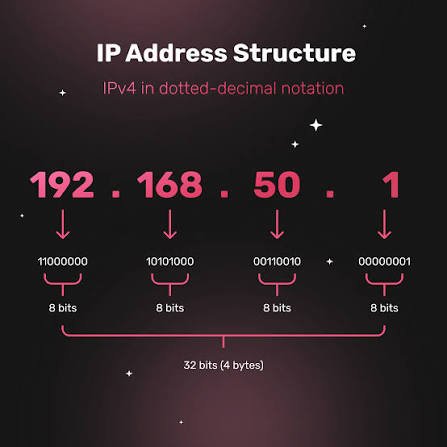
An IP address is a numerical identifier used to communicate across an IP network. The address in question follows the familiar IPv4 format, consisting of four decimal numbers separated by periods.
124.105.5.80 falls within the 124.105.0.0/19 range. That block contains 8,192 IPv4 addresses, running from 124.105.0.0 through 124.105.31.255. Network databases currently associate this range with PLDT and AS9299.
That distinction matters. Seeing an address associated with an ISP does not necessarily mean the ISP itself is operating a particular website or device at that exact address. Large address blocks can be used for many customers, services, connections, and infrastructure purposes.
Who Owns or Operates the Network?
Current routing and registration information associates the relevant network block with Philippine Long Distance Telephone Company, commonly known as PLDT. The autonomous system number associated with the network is AS9299.
The network is registered through APNIC, the regional Internet registry responsible for IP resources across the Asia-Pacific region. The 124.105.0.0/19 block is listed as assigned and associated with the Philippines.
This tells you something useful about the network infrastructure, but it does not prove who was using the individual address at a particular moment.
Where Is This IP Address Located?
Public IP databases can provide a geographic estimate, but IP geolocation should never be treated as a GPS coordinate.
For this address range, available registration and routing data point to the Philippines.
The practical limitation is important: an IP can represent an ISP network serving customers across a broad area. Databases may disagree about city-level information, and the result can change as providers reorganize infrastructure or update their records.
So, if a lookup says an IP is in a particular city, read that asnetwork-location information, not proof that a person or computer is physically sitting there.
Is 124.105.5.80 a Website?
Not necessarily.
An IP address can be assigned to a server, broadband connection, enterprise network, hosting environment, or another Internet-connected resource. An address also does not have to host a website at all.
The broader 124.105.5.0/24 range contains multiple addresses with reverse-DNS records, but current range data does not list a reverse-DNS hostname for 124.105.5.80 itself.
That is a useful reminder that an IP lookup should not be confused with a domain lookup. A domain name can point to an IP, but the reverse relationship is not always available or one-to-one.
What Can an IP Lookup Tell You?
A basic lookup can reveal several useful pieces of information:
| Information | What it can tell you | Reliability |
|---|---|---|
| IPv4 address | The numerical network identifier | High |
| ASN | Which autonomous system announces the network | High |
| ISP/network organization | The organization associated with the address block | Generally high |
| Country | Approximate network registration/geolocation | Moderate |
| City | Possible geographic estimate | Variable |
| Exact person | Usually unavailable from public lookup | Not provided |
| Exact physical address | Not revealed by a normal IP lookup | Not available |
This is where many online explanations go wrong. They take a network-level clue and present it as if it were personal identification.
What Does the Address Mean in a Real-World Situation?
Imagine a small business owner checking firewall logs after noticing several connection attempts overnight. The log contains 124.105.5.80.
The sensible first step is not to assume that the address belongs to an attacker. Instead, the administrator could check the timestamp, destination port, connection frequency, application involved, and whether the traffic was accepted or blocked. The IP can then be compared with other indicators from the same event.
I have found that this way of reading an IP log is much more useful than simply searching the number and treating the first location result as the whole story.
If the address appears once during an ordinary web connection, it may mean very little. Repeated unexpected connections to a sensitive service deserve closer investigation, but the address alone is not enough to establish malicious intent.
How to Investigate 124.105.5.80
If this address appeared in your logs, a structured investigation can be surprisingly simple.
First, identify when the connection occurred. A timestamp provides context that an isolated IP number cannot.
Next, determine what protocol or port was involved. A web connection, mail service, DNS request, and remote-access attempt can have very different meanings.
Then check the address through multiple reputable network databases. Look for consistent information about the ASN, announced prefix, registration region, and reverse DNS.
Finally, compare the result with your own logs. If the same source appears repeatedly and interacts with an unexpected service, investigate the surrounding traffic rather than judging the address by geography alone.
Current routing data shows the 124.105.0.0/19 block being announced through AS9299, with routing information also showing the larger 124.105.0.0/16 and 124.104.0.0/14 aggregates associated with the same autonomous system.
Is This IP Dangerous?
There is no reliable basis for declaring an IP address dangerous simply because someone searched for it or because it appears in a log.
An IP address is an identifier, not a verdict.
If you received unexpected traffic from it, examine the behavior associated with that traffic. Useful signals include repeated login attempts, unusual port scans, excessive request volume, suspicious application activity, or connections that contradict your normal network patterns.
For security work, context is considerably more valuable than a simplistic “safe” or “dangerous” label.
Public IP vs Private IP: Why the Difference Matters
It is also worth distinguishing a public address such as this one from private addresses such as 192.168.1.1 or 10.0.0.1.
Private IP addresses are commonly used inside local networks and are not globally routable in the same way. A public IPv4 address, by contrast, can participate in Internet routing.
That means an address beginning with 124 is fundamentally different from the private address you might see assigned to a laptop, phone, printer, or home router.
Can You Find the Person Behind the Address?
Normally, no.
Public lookup services can associate an address with a network operator, autonomous system, country, and sometimes an approximate region. They generally cannot tell an ordinary user the name, home address, or other private identity information of the subscriber.
An ISP may have additional customer records, but access to such information is governed by its policies and applicable legal processes.
This is why responsible IP research should focus on network attribution and observable behavior, rather than attempting to identify private individuals from an address alone.
Also Read: 111.90.1502 Explained: Meaning, Format & IP Address Guide
Conclusion
124.105.5.80 is a public IPv4 address within the 124.105.0.0/19 network. Current network information associates that range with AS9299 and Philippine Long Distance Telephone Company (PLDT) and places its registration in the Philippines.
The most important takeaway is that an IP address provides network context, not a complete identity profile. Its ISP association, routing information, and approximate geographic signals can help with troubleshooting and security analysis, but none should automatically be interpreted as proof of a person’s identity, exact location, or malicious behavior.
If you encountered this address in a log, investigate the surrounding connection details. That extra context is what turns a string of numbers into genuinely useful network intelligence.
FAQs
What is 124.105.5.80?
It is a public IPv4 address belonging to the 124.105.0.0/19 network range. Current routing information associates that range with AS9299 and Philippine Long Distance Telephone Company.
Is 124.105.5.80 located in the Philippines?
Network registration and routing information associate the relevant address range with the Philippines. However, this does not establish the exact physical location of the device using the address.
Who is the ISP for this IP?
The network is associated with Philippine Long Distance Telephone Company (PLDT), operating under AS9299.
Can an IP address reveal someone’s exact location?
No. IP geolocation generally provides an estimate of network location. It cannot reliably reveal a person’s exact home or physical address.
Is this IP automatically a security threat?
No. An IP address alone does not establish malicious activity. Security analysts should examine connection behavior, ports, timestamps, frequency, and other evidence before drawing conclusions.
What should I do if I see this address in my server logs?
Check when the connection occurred, which port or service was contacted, whether the request succeeded, and whether similar activity occurred repeatedly. Compare those findings with your firewall and application logs before taking action.