
At first glance, 111.90.1502 looks like an IP address. The periods make it resemble the familiar format used for IPv4 addresses, so it is understandable if you expect it to identify a computer, server, router, or another device on a network.
There is, however, an important technical detail that changes the picture.
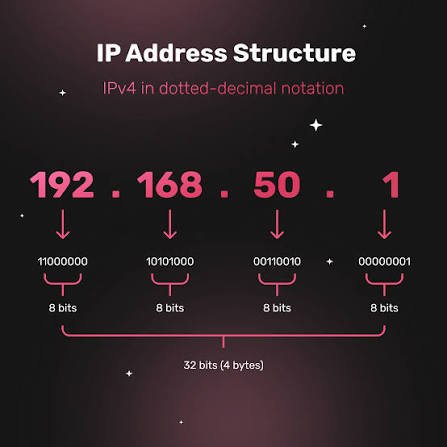
A conventional IPv4 address contains four octets, and each octet represents a value from 0 through 255. The string 111.90.1502 has four numerical sections, but its final section—1502—is far above the permitted range. Therefore, it is not a valid conventional IPv4 address in standard dotted-decimal notation. The IPv4 specification defines addresses as 32-bit values divided into four octets.
That does not necessarily mean the number is meaningless. It may be a typing mistake, an internal identifier, a version-style number, or simply a malformed value copied from another source. Understanding the context is the key.
What Is 111.90.1502?
The simplest description is that it is a dotted numerical string that resembles an IPv4 address but does not conform to normal IPv4 formatting.
Consider a typical IPv4 address such as:
192.168.1.1
Each of its four sections falls between 0 and 255. By comparison:
111.90.1502
contains a final section of 1502.
That single value makes the difference.
| Feature | Standard IPv4 | 111.90.1502 |
|---|---|---|
| Four sections | Yes | Yes |
| Period separators | Yes | Yes |
| Maximum value in each octet | 255 | Final value is 1502 |
| Conventional IPv4 format | Valid structure | Invalid |
| Could be another identifier? | Yes | Possible |
So, although the appearance is similar, the two strings should not be treated as equivalent.
Why Does It Look Like an IP Address?
IPv4 is one of the most recognizable numerical addressing systems on the internet. Its addresses use four octets, which are commonly displayed as four decimal numbers separated by periods. The underlying address is 32 bits in length.
That familiar pattern creates an easy trap.
When people see a string such as 111.90.1502, the brain naturally fills in the missing assumptions: perhaps it is a server address, a website’s IP, or an address appearing in a security log.
But formatting alone is not enough.
The final component has to fit within the valid octet range. Since 1502 cannot be represented as one ordinary eight-bit IPv4 octet, the string fails that basic test.
Could 111.90.1502 Be a Typographical Error?
Absolutely.
One plausible explanation is that a separator was omitted. For instance, someone may have intended to write:
111.90.150.2
That version contains four octets—111, 90, 150, and 2—and every component falls within the conventional 0–255 range.
However, it would be inaccurate to automatically “correct” the original value this way. Without seeing the source where the number appeared, there is no reliable basis for saying that 111.90.150.2 was definitely intended.
This distinction matters when dealing with technical information. A tiny formatting change can point to an entirely different address or identifier.
Where Might You Encounter This Number?
An unusual dotted number can appear in several places.
Network Logs
System administrators often inspect logs when diagnosing connectivity issues, suspicious traffic, or application errors. If a log contains an incorrectly formatted value, it may be the result of a data-processing or formatting problem rather than a genuine network address.
Website Analytics
Analytics platforms sometimes collect technical information about visitors and requests. Depending on how data is processed or exported, a number may appear differently from the original source.
Software or Database Records
Not every dotted number is an IP address. Developers and organizations may create their own identifiers for records, builds, systems, components, or other resources.
Copy-and-Paste Errors
This is perhaps the most ordinary explanation. A misplaced digit or missing period can turn a valid-looking address into something that no longer follows IPv4 rules.
A Real-World Example
Imagine a website administrator checking an overnight traffic report. They notice 111.90.1502 listed beside a failed request and initially assume it is the visitor’s IP address.
Instead of blocking it immediately, the administrator checks the format. The final component is 1502, so it cannot be an ordinary IPv4 octet. The administrator then reviews the original log and discovers that the data-export process had merged two fields.
That simple verification prevents an unnecessary security rule from being created.
The lesson is useful beyond this particular number: validate technical data before taking action based on it.
How It Compares With a Valid IPv4 Address
The easiest way to understand the issue is to compare the unusual string with a conventional address.
| Example | Four parts? | Each part 0–255? | Conventional IPv4 format? |
|---|---|---|---|
| 192.168.1.1 | Yes | Yes | Yes |
| 111.90.150.2 | Yes | Yes | Yes |
| 111.90.1502 | Yes | No | No |
| 10.0.0.25 | Yes | Yes | Yes |
The important point is that 111.90.1502 is not invalid simply because it contains periods or looks unusual. It fails because one of its apparent octets is outside the permitted range.
Does This Number Indicate a Security Threat?
Not by itself.
An unfamiliar technical number can certainly appear in a security investigation, but the string alone does not establish that something malicious happened. Likewise, an invalid IP-style value does not automatically mean your computer, website, or network has been attacked.
If you encounter it unexpectedly, look at the surrounding evidence:
-
Where did the number appear?
-
Was it shown in a browser, email, application, or server log?
-
Was it associated with an error?
-
Was someone asking you to connect to it?
-
Did the value come from a trusted system?
-
Does the original record contain additional characters or separators?
Context is much more informative than the number’s appearance.
What Should You Do If You Find 111.90.1502?
Start by preserving the original information. Do not immediately change it into another IP address.
Next, check whether the source may contain a formatting error. If the value came from a log, compare it with the raw log entry. If it came from software, look at the application’s documentation or configuration.
If someone sent you the number and asked you to visit an unfamiliar website, download software, or provide credentials, treat the request cautiously. The unusual format is a reason to verify the information—not proof that the sender is malicious.
I have found that checking the original source before interpreting an unfamiliar technical string is often the fastest way to avoid chasing the wrong problem.
Why Correct IP Formatting Matters
IPv4 addresses are foundational to internet communication. The Internet Protocol uses addresses to identify sources and destinations so that datagrams can be delivered through interconnected networks.
Because the addressing system is structured, precision matters.
A single missing period can transform:
111.90.150.2
into:
111.90.1502
The result may look similar to a casual reader while being fundamentally different to a networking system.
For IT professionals, website owners, developers, and everyday users, recognizing that distinction can make troubleshooting considerably easier.
What About the 111.90.x.x Range?
It is also important not to confuse 111.90.1502 with an entire IP range.
The first two portions—111 and 90—do not make the original string valid or invalid on their own. The problem is specifically the value 1502 when interpreted as one IPv4 octet.
IANA maintains the authoritative IPv4 address-space registry and related special-purpose registries. Those resources are useful when you have a properly formatted IPv4 address and need to investigate its allocation or special-purpose status.
In other words, first establish that the address is syntactically valid; only then does deeper address-space investigation make sense.
Also Read: 183.63.127.22: IP Address Guide, Location & Safety Tips
Conclusion
111.90.1502 is not a conventional IPv4 address in standard dotted-decimal form. Its structure resembles an IPv4 address, but the final component, 1502, exceeds the normal maximum of 255 for an IPv4 octet. The underlying IPv4 specification defines addresses as four-octet, 32-bit values.
The number could be a typo, a formatting problem, an internal reference, or another type of technical identifier. Without knowing where it came from, it would be misleading to assign it a specific meaning.
The most useful approach is simple: preserve the original value, check its source, verify the formatting, and only then decide what it represents. That small habit can prevent incorrect troubleshooting and unnecessary security concerns.
FAQs
Is 111.90.1502 a valid IP address?
No. In conventional IPv4 notation, each of the four octets must fit within the 0–255 range. The final component, 1502, is outside that range.
Could 111.90.1502 be a real server address?
Not as a conventional IPv4 address in that exact dotted-decimal form. It could, however, be an identifier used by a particular application, database, or system.
Could it be a typing mistake?
Yes. A missing period or incorrectly entered digit could easily produce this kind of value. One possible intended address might be 111.90.150.2, but that should only be assumed if the original context supports it.
Is 111.90.1502 dangerous?
The number itself does not prove that anything is dangerous. If it appeared in a suspicious email, website, download prompt, or unexpected security alert, investigate the entire context rather than judging the number alone.
How can I check an unfamiliar IP address?
First confirm that it follows valid IPv4 formatting. If it does, you can then use authoritative address-registration and network-information services to investigate the relevant address block. IANA maintains IPv4 allocation and special-purpose registries.
What is the difference between 111.90.1502 and 111.90.150.2?
The latter has four valid IPv4 octets: 111, 90, 150, and 2. The former treats 1502 as a single fourth component, which exceeds the normal IPv4 octet limit.