Choosing the right scheduling software can make a noticeable difference in how efficiently you manage appointments, sales calls, consultations, and team meetings. One popular option is Calendly. It helps individuals and businesses coordinate meetings without endless email conversations.
However, before subscribing, it is important to understand what each subscription includes, how much it costs, and whether upgrading is actually worthwhile.
Understanding calendly pricing makes it easier to select a plan that matches your scheduling requirements without spending money on features you rarely use. From a free account to advanced business solutions, Calendly offers different options for different types of users.
Let’s explore its plans, features, costs, and overall value.
What Is Calendly and How Does Its Pricing Work?
Calendly is an online appointment scheduling platform that connects with your calendar and allows other people to book available time slots. Instead of manually arranging meetings, you can share a booking page and let visitors select a suitable time.
The platform is useful for freelancers, consultants, recruiters, sales professionals, educators, and growing companies.
Its subscription structure includes free and paid options. Paid subscriptions generally charge per seat, meaning each person who needs to connect a calendar and host meetings may require a separate paid seat.
This distinction matters when calculating the total cost for a business. A company with ten employees does not necessarily need ten subscriptions if only three people host meetings.
Calendly Pricing Plans Explained
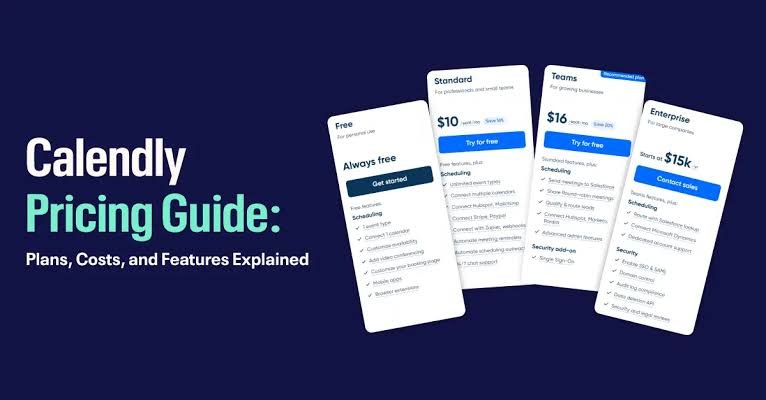
Calendly offers several subscription options, including Free, Standard, Standard Plus, Teams, Teams Plus, and Enterprise. Each plan targets a different level of scheduling complexity.
The following prices are in US dollars and reflect the published annual-billing rates available in November 2026. Monthly billing generally costs more.
Prices are per seat per month unless stated otherwise.
| Plan | Annual billing | Monthly billing |
|---|---|---|
| Free | $0 | $0 |
| Standard | $10 | $12 |
| Standard Plus | $18 | $24 |
| Teams | $16 | $20 |
| Teams Plus | $24 | $32 |
| Enterprise | From $15,000/year | Custom |
These prices provide a starting point, but the final subscription cost depends on the number of users, billing frequency, and additional services.
Calendly+2
1. Free Plan: A Good Starting Point
The Free plan is designed for individuals who need basic appointment scheduling without paying a monthly subscription.
It includes:
-
One active event type.
-
One connected calendar.
-
Unlimited one-on-one meetings.
-
A customizable booking page.
-
A personalized scheduling link.
-
Browser extension access.
For example, a freelancer who offers a single 30-minute consultation can share a booking link with potential clients and allow them to choose an available time.
The main limitation is that users cannot create multiple active event types. Someone offering introductory calls, project discussions, and paid consultations may quickly need an upgrade.
For beginners, however, the free subscription is a practical way to understand the platform before committing financially.
2. Standard Plan: Better Scheduling Flexibility
The Standard plan is suitable for professionals who manage different types of appointments and need more control over their booking process.
At $10 per seat per month with annual billing, it provides more flexibility than the free option.
Key features include:
-
Unlimited event types.
-
Multiple calendar connections, up to six.
-
Automated reminders and scheduling workflows.
-
Stripe and PayPal integrations.
-
HubSpot and Mailchimp connections.
-
Group scheduling features.
-
Additional booking customization.
This subscription makes sense for consultants, agencies, coaches, and service providers who regularly organize different meetings.
For instance, a digital marketing consultant might offer a free discovery call, a technical SEO consultation, and a monthly client review. Separate booking types help organize these services more professionally.
3. Standard Plus: Additional AI Meeting Assistance
Standard Plus combines Standard scheduling capabilities with additional meeting-management features.
Its published annual price is $18 per seat per month.
One of its distinguishing additions is access to Notetaker and Callie features, subject to their availability and applicable plan conditions.
These tools can help users manage meeting information, generate summaries, prepare follow-up emails, and coordinate scheduling through email.
This option may be useful for professionals who spend considerable time reviewing meeting discussions and organizing follow-up activities.
However, individuals who only need appointment booking may not receive enough additional value to justify the higher subscription cost.
4. Teams Plan: Designed for Growing Businesses
The Teams plan is intended for companies that need more than individual appointment scheduling. It provides tools for coordinating multiple employees, distributing bookings, and managing incoming leads.
The annual subscription starts at $16 per seat per month, while monthly billing is $20 per seat.
Important features include:
-
Round-robin meeting distribution.
-
Team scheduling.
-
Lead qualification and routing forms.
-
Centrally managed event types.
-
Salesforce integration.
-
Marketo and Pardot connections.
-
Additional administrative controls.
One particularly useful feature is round-robin scheduling. It distributes incoming appointments among available team members according to the configured scheduling rules.
For example, imagine a digital marketing agency with five sales representatives. Instead of allowing every potential customer to contact the same employee, the agency can distribute consultation bookings across its team.
This reduces manual coordination and helps employees manage their workloads more effectively.
5. Teams Plus: More Tools for Meeting Management
Teams Plus combines team scheduling capabilities with additional AI-powered meeting assistance.
At $24 per seat per month with annual billing, it is aimed at organizations that want scheduling automation alongside meeting summaries and follow-up support.
It can be particularly valuable for sales departments, recruitment agencies, and customer support teams that organize numerous conversations every week.
Nevertheless, businesses should evaluate how frequently employees will use these additional capabilities before purchasing.
6. Enterprise Plan: Advanced Business Requirements
Larger organizations often have different requirements from individual professionals and small businesses.
Calendly’s Enterprise plan starts at $15,000 annually and requires at least 50 seats.
It offers advanced capabilities, including:
-
Single sign-on and SAML security.
-
Domain control.
-
Advanced administrative management.
-
Audit log compliance.
-
Data deletion API.
-
Microsoft Dynamics integration.
-
Dedicated account support.
-
Guided onboarding and implementation.
This subscription is designed for organizations that require centralized management, stronger security controls, and support during large-scale implementation.
For a small business with only a few employees, Enterprise would generally be unnecessary.
Calendly+1
Calendly Plans Compared: Which One Offers the Best Value?
Comparing subscription features side by side makes the decision easier. The cheapest option is not always the most suitable, particularly when a business depends on scheduling automation.
| Plan | Best suited for | Main advantage |
|---|---|---|
| Free | Beginners | Basic appointment booking |
| Standard | Freelancers | Multiple event types |
| Standard Plus | Professionals | AI meeting assistance |
| Teams | Growing companies | Team scheduling and routing |
| Teams Plus | Sales departments | Team tools and AI assistance |
| Enterprise | Large organizations | Security and administration |
In my experience reviewing scheduling workflows, the biggest difference between these subscriptions is not simply the number of features but how much time they save during everyday operations.
A freelancer may find Standard sufficient, while a company managing multiple sales representatives could benefit more from Teams.
How Much Does Calendly Cost for Multiple Users?
One important detail people sometimes overlook is the per-seat billing structure.
Suppose a business needs five Standard subscriptions. At the annual billing rate of $10 per seat, its basic subscription cost would be $50 per month, or $600 annually.
For five Teams seats at $16 each, the cost becomes $80 monthly, or $960 annually.
This calculation helps businesses estimate expenses before adding employees to their accounts.
It is also worth remembering that meeting invitees do not need paid seats simply to book appointments. Generally, seats are required for the people hosting meetings and connecting their calendars.
Is Calendly Worth Paying For?
Whether Calendly is worth the investment depends on how frequently you schedule appointments and how much administrative work you want to eliminate.
For occasional personal meetings, the Free plan may be enough. However, businesses handling regular customer consultations, sales discussions, and recruitment interviews may benefit from paid features.
Consider the following real-world scenario.
A freelance web designer receives appointment requests from several potential clients every week. Without scheduling software, the designer might spend hours exchanging messages to find suitable meeting times. By using a dedicated booking page, clients can select available slots themselves.
This saves administrative time and creates a more organized experience for potential customers.
The real value is not simply having an online calendar. It is reducing unnecessary communication while making the booking process easier for everyone involved.
What to Consider Before Choosing a Subscription
Before selecting a plan, consider these practical factors:
Number of event types: If you offer multiple services or consultation formats, Standard may be more appropriate than Free.
Team size: Calculate how many employees actually need hosting privileges instead of purchasing unnecessary seats.
Automation requirements: Automated reminders and integrations can be valuable when managing regular appointments.
Annual versus monthly billing: Annual subscriptions generally offer lower per-seat prices, but monthly billing provides greater flexibility.
Additional features: Notetaker, Callie, advanced administration, and security tools should be evaluated according to actual business needs.
A careful assessment can prevent unnecessary spending and help you choose a subscription that remains useful as your business grows.
Also Read: What Time Do Bars Close in Nashville? Nightlife Guide
Conclusion
Understanding Calendly pricing helps individuals and businesses make smarter decisions about appointment scheduling software. The Free plan is a reasonable starting point, Standard offers greater flexibility, and Teams provides useful tools for organizations managing multiple employees.
Standard Plus and Teams Plus add AI-powered meeting assistance, while Enterprise targets larger organizations with advanced security and administrative requirements.
Ultimately, the best subscription is the one that supports your daily workflow without adding unnecessary expenses. Start by identifying your scheduling needs, calculating the number of required seats, and comparing the available features before committing to a long-term subscription.
FAQs
1. Is Calendly free to use?
Yes. Calendly offers a Free plan that includes one active event type, one calendar connection, and unlimited one-on-one meetings. It is suitable for individuals with basic scheduling requirements.
2. What is the cheapest Calendly paid plan?
Standard is the entry-level paid subscription. It starts at $10 per seat per month when billed annually.
3. Does Calendly charge per user?
Yes. Paid subscriptions generally use per-seat pricing. People who host meetings and connect calendars need seats, while invitees can book appointments without purchasing subscriptions.
4. Is Calendly Standard better than Free?
Standard is better for users who need multiple event types, additional calendar connections, automated reminders, and payment integrations. Free remains suitable for basic appointment scheduling.
5. Does Calendly offer monthly billing?
Yes. Standard and Teams offer monthly billing at higher rates than their annual-billing prices. Enterprise uses custom pricing.
6. Which Calendly plan is best for businesses?
Teams is a strong option for businesses that need round-robin scheduling, lead routing, and team coordination. Larger organizations may require Enterprise features.