Some games require downloads, lengthy tutorials, or complicated controls. Others let you jump straight into the action. Google Block Breaker belongs to the second category: a simple, brick-breaking arcade experience that brings classic gaming fun to your browser.
Whether you’re taking a short break from work, relaxing after studying, or searching for a nostalgic game, this paddle-and-ball challenge is easy to understand but surprisingly tricky to master. You don’t need advanced gaming skills to get started. What matters most is timing, concentration, and knowing where to position your paddle.
In this guide, you’ll discover what the game is, how to access it, how its controls work, and which strategies can help you achieve a better score.
What Is Google Block Breaker?
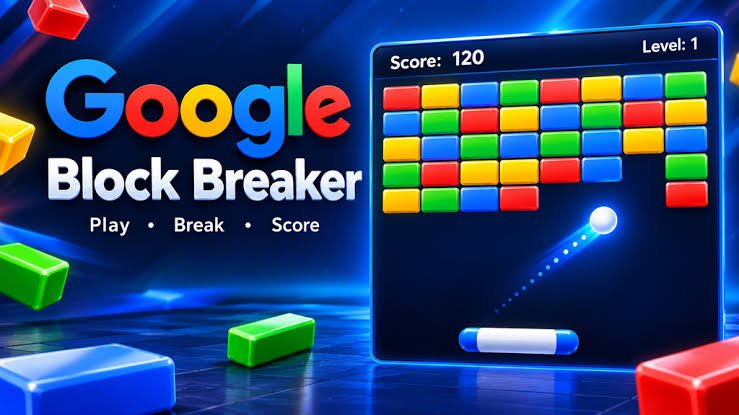
Google Block Breaker is a browser-based arcade game associated with Google’s Search experience. It follows the familiar brick-breaker concept: a ball travels around the screen, and you control a paddle to bounce it toward rows of blocks.
The objective is straightforward. Break the blocks, keep the ball in play, and progress through the available stages without losing all your chances.
The game’s appeal comes from its simplicity. Unlike complex action games, it doesn’t require hours of practice before you can enjoy it. A few rounds are enough to understand the basics, although improving your accuracy takes more effort.
It’s also worth distinguishing Google’s Search game from independent brick-breaker websites. Many third-party games use similar names and mechanics, but their levels, controls, graphics, and features may differ. The version you encounter can depend on the particular platform you’re using.
How to Play Google Block Breaker
Getting started is simple, provided the interactive game is available in your region and search interface.
-
Open Google Search in your preferred web browser.
-
Enter “Block Breaker” or “Google Block Breaker” in the search box.
-
Look for an interactive game card among the search results.
-
Select the play option if the game card appears.
-
Move the paddle horizontally to bounce the ball toward the blocks.
-
Continue breaking blocks while preventing the ball from falling past your paddle.
That’s all you need to begin. There is generally no separate installation required to play a game embedded directly in Search.
If the game doesn’t appear, try searching on Google.com, refreshing the page, or using an updated browser. Availability can vary, so a missing game card doesn’t necessarily mean your device is faulty.
Understanding the Controls
The controls are designed to make the game accessible to beginners. Exact inputs can vary between Google’s version and third-party alternatives, so follow the instructions displayed within your chosen game.
|
Action |
Desktop |
Mobile |
|---|---|---|
|
Move the paddle |
Supported keyboard keys or on-screen controls |
Swipe or drag horizontally |
|
Launch the ball |
Use the displayed launch key or control |
Tap the screen if prompted |
|
Keep the ball in play |
Track its movement and reposition the paddle |
Follow the ball with your finger |
|
Restart a round |
Select the restart option, if available |
Tap the restart control, if available |
The real challenge isn’t moving the paddle. It’s predicting where the ball will land. Watching its direction instead of simply reacting at the last second gives you more time to make accurate movements.
Tips to Improve Your Score
A little strategy can make a noticeable difference. Instead of moving randomly, pay attention to the ball’s trajectory and think about where you want it to go next.
1. Aim for Open Spaces
One of the most effective techniques is getting the ball behind or above the main block formation. Once there, it may bounce repeatedly through the blocks, breaking several without requiring you to intercept every shot.
Look for gaps near the sides of the formation. Creating an opening can give the ball more room to travel and increase the number of blocks it hits.
2. Learn to Control the Bounce
The point where the ball strikes your paddle influences its direction in many brick-breaker games. A central hit generally produces a more direct rebound, while an off-center hit sends the ball at a sharper angle.
I find that focusing on the ball’s landing point rather than chasing it with sudden movements is the most useful habit to develop in this style of arcade game.
3. Use Power-Ups Wisely
Some versions include special blocks that release helpful abilities. Google’s Search version has been reported to feature effects such as extra balls, an extended paddle, and explosive blocks. These can help clear crowded areas more quickly.
However, don’t sacrifice ball control just to collect every bonus. Keeping the ball in play is usually more valuable than chasing a power-up that takes you out of position.
4. Stay Calm as the Game Speeds Up
As a round progresses, the ball can become harder to track. Avoid making large, unnecessary paddle movements. Watch its direction, estimate where it will descend, and move early enough to meet it.
For example, imagine you’re playing during a ten-minute break before an online meeting. You clear the first few rows quickly, but the remaining blocks become harder to reach. Instead of rushing, you focus on opening a channel through one side. That small adjustment gives the ball more opportunities to strike multiple blocks, helping you extend the round without relying entirely on luck.
Google Block Breaker vs. Other Brick-Breaker Games
Although many games share the same basic concept, the experience can vary depending on where you play.
|
Feature |
Google’s Search game |
Third-party brick-breaker games |
|---|---|---|
|
Access |
Through Google Search when available |
Through a game website or app |
|
Installation |
Usually not needed |
Depends on the platform |
|
Gameplay |
Classic paddle-and-ball action |
May include classic or modified mechanics |
|
Special features |
Google-themed blocks and reported power-ups |
Features vary by developer |
|
Best suited for |
Quick, casual sessions |
Players seeking different modes or longer progression |
The biggest advantage of the Search version is convenience. You can move from searching for information to playing a quick arcade game without installing another application. Independent alternatives may be a better fit if you want additional modes, persistent progress, or offline play.
Is Google Block Breaker Safe and Free?
The game embedded in Google Search is designed as a convenient browser experience rather than a paid game download. You generally don’t need to purchase an app or install additional software to access it.
Be careful when searching for unofficial versions, however. A website using a similar name isn’t necessarily operated by Google. Check the domain before downloading files, granting permissions, or entering personal information.
If your goal is simply to enjoy a quick game, starting with Google Search is a sensible option. If the interactive game doesn’t appear, you can explore reputable alternatives without assuming that every website offering the same gameplay is official.
Also Read: Social Security Office: Services, Locations & Help
Conclusion
Google Block Breaker combines classic arcade mechanics with the convenience of browser-based gaming. Its simple controls make it approachable for new players, while changing ball angles, tighter openings, and increasingly challenging rounds reward patience and practice.
To get started, search for the game on Google and select the interactive play option if it’s available. Focus on predicting the ball’s movement, using paddle angles deliberately, and maintaining control when the pace increases.
The most useful lesson is simple: breaking blocks is only half the challenge. Learning to guide the ball where you want it to go is what turns an ordinary round into a better score.
FAQs
1. What is Google Block Breaker?
It’s a Breakout-style arcade game associated with Google Search. Players move a paddle to bounce a ball into blocks, aiming to clear the playing field while keeping the ball in play.
2. How do I play Google Block Breaker for free?
Open Google Search, enter “Block Breaker,” and look for the interactive game card. If it appears, select Play. The Search version generally requires no separate download or payment.
3. Can I play the game on my phone?
Yes, the Search game has been reported as available on mobile browsers and the Google app. When accessible, you can use the displayed touch controls to move the paddle and keep the ball in play.
4. Why isn’t the game appearing in Google Search?
The feature may not be available in your current region or search interface. Try refreshing the page, updating your browser, or searching on Google.com. Availability can vary, and these steps don’t guarantee the game will appear.
5. Is Google Block Breaker the same as Atari Breakout?
No. Both use the classic brick-breaking concept, but Google’s modern Search game is distinct from the older Atari Breakout Easter egg that turned Google Images results into playable blocks.
6. How can I get a higher score?
Watch the ball’s trajectory, position the paddle before the ball reaches the bottom, and aim for openings that allow it to bounce through several blocks. Use available power-ups when they help rather than distract you from maintaining control.
7. Can I play without downloading an app?
The version embedded in Google Search generally runs in your browser without a separate installation. Third-party versions may have different requirements, so check the platform before downloading anything.