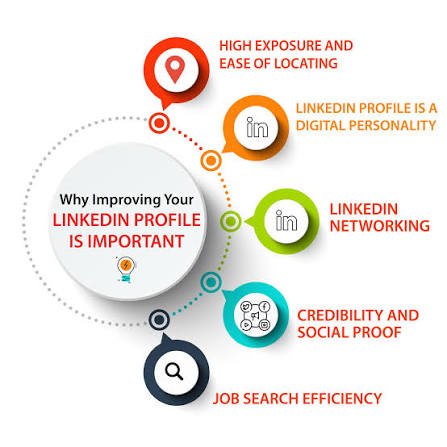
The professional world is changing rapidly, and building the right connections can make a significant difference in career development. Whether someone is searching for a new job, promoting a business, finding potential clients, or learning new skills, having a strong online professional presence has become increasingly valuable. This is where LinkedIn comes into the picture.
LinkedIn is a professional networking platform that helps individuals and organizations connect, communicate, share knowledge, and discover career opportunities. Unlike traditional social media platforms that mainly focus on entertainment and personal updates, it is designed around professional relationships, employment, business development, and industry discussions.
From students and freelancers to experienced professionals and company owners, people use this platform for different purposes. Understanding its features and using them strategically can help turn an ordinary profile into a valuable professional resource.
What Is LinkedIn and How Does It Work?
LinkedIn is an online professional networking service launched on May 5, 2003. It was created to help professionals establish connections and explore opportunities across different industries. Microsoft acquired the platform in 2016, and it has continued to develop its professional networking and business services.
The basic idea is straightforward: members create professional profiles, connect with other people, follow organizations, publish content, and participate in industry conversations.
A profile works somewhat like an online résumé. It can include employment history, education, qualifications, certifications, skills, and professional achievements. Recruiters, potential clients, and other professionals can use this information to understand someone’s background.
Users can also search for companies, job vacancies, industry experts, and relevant discussions. This makes the platform useful for people at almost every stage of their professional journey.
Important Features That Make LinkedIn Useful
The platform offers several tools that support career development and business communication. Each feature serves a different purpose.
1. Professional Profiles
A professional profile is the foundation of the entire experience. It allows users to present their qualifications, work experience, achievements, and career interests in one accessible place.
A strong profile should include:
- A clear and professional profile photograph.
- A descriptive headline explaining your professional role.
- An informative About section.
- Relevant employment history.
- Education and professional certifications.
- Skills, recommendations, and achievements.
A complete profile makes it easier for visitors to understand what you do and whether your experience matches their requirements.
2. Networking and Professional Connections
Networking is one of the platform’s most valuable features. Members can connect with colleagues, employers, business owners, former classmates, industry specialists, and potential customers.
However, building a useful network is not simply about collecting hundreds or thousands of connections. Relevant relationships are generally more valuable than random invitations.
Sending a personalized connection request, participating in meaningful conversations, and maintaining professional relationships can help create opportunities over time.
3. LinkedIn Jobs
The Jobs section helps people discover employment opportunities across different industries and locations. Users can search for positions, explore company information, save interesting vacancies, and apply for suitable roles.
Job seekers can also configure job alerts and, where available, indicate that they are open to new opportunities.
For employers, the platform provides recruitment tools that help businesses advertise vacancies and discover potential candidates.
4. Content Publishing and Professional Discussions
Members can publish posts, share articles, upload relevant media, and participate in conversations about their industries.
For example, a digital marketer might share search engine optimization insights, while a software developer could discuss programming challenges or emerging technologies.
Consistently publishing useful information can help establish professional credibility. The important factor is providing genuine value instead of posting simply to attract reactions.
5. LinkedIn Learning
Learning new skills is another important part of professional development. LinkedIn Learning provides educational courses covering subjects such as leadership, business management, marketing, software development, design, and technology.
Access to courses depends on the applicable subscription or learning arrangement. Nevertheless, the platform can help professionals identify skills they want to develop and explore relevant training opportunities.
Free LinkedIn Account vs. Premium Subscription
One common question among new members is whether a paid subscription is necessary. The answer depends on individual goals and the features someone needs.
| Feature | Free Account | Premium Subscription |
|---|---|---|
| Professional profile | Yes | Yes |
| Basic networking | Yes | Yes |
| Job searching | Yes | Yes |
| Basic messaging | Yes, subject to connection limits and access | Additional messaging options |
| Advanced insights | Limited | More available insights |
| Profile visibility tools | Basic | Additional features |
| Learning access | Limited or separately available | Depends on subscription |
| Advanced professional tools | Limited | More options, depending on plan |
A free account is sufficient for many students, freelancers, and professionals who mainly want to maintain a profile and build connections. Premium subscriptions may be useful for people who need additional job-search, networking, sales, or business tools.
It is sensible to understand the available features before paying for an upgrade.
How to Create a Strong LinkedIn Profile
Creating an account is relatively simple, but building a professional presence requires more attention.
Start by registering with your email address and providing the requested information. After creating an account, complete your profile instead of leaving important sections empty.
Choose a suitable photograph and write a headline that explains your professional identity. Avoid vague descriptions such as “Looking for opportunities” when you can communicate your actual skills and specialization.
Your About section should explain what you do, what experience you bring, and the type of professional work that interests you. Keep the language natural and easy to understand.
Add relevant experience, education, certifications, and skills. If you have completed projects, include them where appropriate. Recommendations from colleagues or clients can also strengthen the credibility of your profile.
I find that a profile becomes much more useful when it explains not only someone’s job title but also the problems they can solve and the value they can deliver.
How Businesses and Freelancers Can Benefit
LinkedIn is not limited to people searching for traditional employment. Businesses, agencies, consultants, and independent service providers can also use it to develop professional relationships.
A business can create a Company Page to introduce its services, share updates, communicate its identity, and attract potential employees or customers.
Freelancers can showcase completed projects, publish industry insights, and connect with people who may need their services. For example, an SEO specialist can share website optimization tips, explain technical SEO problems, and demonstrate knowledge through practical discussions.
A realistic example is a small digital marketing agency trying to find clients in the United Kingdom. Instead of sending hundreds of generic messages, its team can identify relevant business owners, follow their company updates, share useful marketing information, and approach suitable prospects with personalized communication.
This relationship-based approach is more professional than treating every connection as an immediate sales opportunity.
LinkedIn vs. Other Social Media Platforms
Different social networks serve different purposes. Understanding their strengths helps users choose where to invest their time.
| Platform | Main Purpose | Suitable Audience |
|---|---|---|
| Professional networking and career development | Professionals, recruiters, businesses | |
| Social communication and community building | General users and businesses | |
| Visual content and brand promotion | Creators, influencers, brands | |
| X | Public discussions and quick updates | Professionals, journalists, communities |
LinkedIn stands out because professional identity and career-related interactions are central to its experience. Other networks may also support business promotion, but their audiences and content styles can be quite different.
Safety and Privacy Tips for Users
Like other online platforms, LinkedIn requires sensible security practices.
Use a strong, unique password and enable two-step verification where available. Review your privacy settings regularly and be careful about sharing personal contact details publicly.
Before responding to a recruiter or business opportunity, examine the person’s profile and verify the organization independently. Be particularly cautious of offers that promise unusually high earnings, request advance payments, or ask for sensitive financial information.
Avoid sending connection requests or automated messages excessively. Authentic communication is more sustainable, and LinkedIn has publicly stated that it takes action against certain forms of artificial engagement and automated activity.
Also Read: Gamdom: Games, Features, Safety and Platform Guide
Conclusion
LinkedIn has developed into an important professional resource for people who want to build relationships, explore employment opportunities, promote businesses, and improve their skills. Its combination of professional profiles, networking tools, job listings, content publishing, and learning resources makes it useful for a wide range of audiences.
However, simply creating an account does not guarantee career growth or business success. The real value comes from maintaining an informative profile, connecting with relevant people, sharing useful knowledge, and communicating professionally.
Whether you are a student, job seeker, freelancer, entrepreneur, or experienced employee, using the platform consistently and thoughtfully can help you build a stronger professional presence.
FAQs
1. What is LinkedIn mainly used for?
LinkedIn is mainly used for professional networking, job searching, recruitment, business promotion, sharing industry knowledge, and career development.
2. Is LinkedIn free to use?
Yes. Anyone can create a basic account without paying a subscription fee. Optional Premium plans provide additional features for different professional and business needs.
3. Can students use LinkedIn?
Absolutely. Students can create profiles, connect with classmates and professionals, explore internships, discover entry-level jobs, and showcase academic projects or certifications.
4. How can I find a job on LinkedIn?
Visit the Jobs section, search using relevant job titles and locations, review available vacancies, and apply through the provided application process. You can also create job alerts and connect with recruiters.
5. What is the difference between LinkedIn and Facebook?
LinkedIn focuses primarily on professional relationships, employment, business communication, and career development. Facebook is generally focused on social connections, entertainment, communities, and personal content.
6. Is LinkedIn useful for freelancers?
Yes. Freelancers can present their services, demonstrate expertise, connect with potential clients, publish useful content, and build professional relationships.
7. Do I need LinkedIn Premium to find clients?
No. A free account provides useful networking and profile features. Premium tools may offer additional capabilities, but freelancers can start developing professional relationships without a paid subscription.