
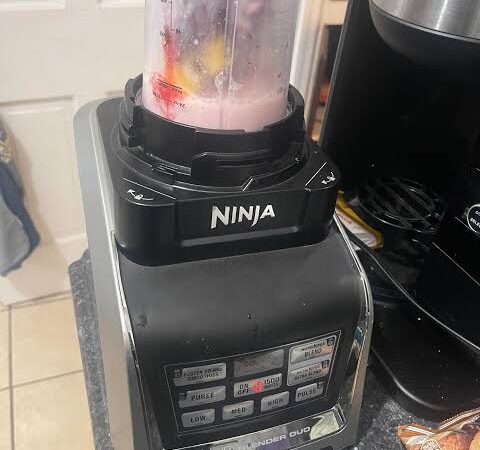
You’re ready to make a smoothie, crush some ice, or prepare a quick breakfast, but your blender has other plans. Instead of starting, the power indicator keeps flashing red. If your Ninja blender power light is blinking red, don’t assume the appliance is broken. In many cases, the issue comes down to an incorrectly positioned pitcher, a loose lid, or an activated safety feature.
The good news? You can often resolve the problem at home without replacing any parts. The important thing is to identify why the blender is refusing to start rather than repeatedly pressing the power button.
This guide explains the most common causes, simple troubleshooting steps, and situations where professional support may be necessary.
Why Is My Ninja Blender Power Light Blinking Red?
A flashing red power light commonly indicates that your blender is not assembled correctly or that a safety condition is preventing the motor from operating. Ninja designs many of its blenders with interlocking safety mechanisms that stop the blades from spinning unless the container and lid are properly secured.
However, the exact meaning of the indicator can vary between models. Some models may also flash when the motor has overheated or the appliance has experienced an overload.
Before trying anything else, switch off the blender and unplug it. Never attempt to adjust the pitcher, lid, or blade assembly while the appliance is connected to power.
5 Common Causes and How to Fix Them
1. The Blender Pitcher Is Not Properly Locked
One of the first things to check is the pitcher or blending cup. Even if it appears to be sitting correctly, it may not be fully engaged with the motor base.
Most traditional Ninja countertop blenders require the pitcher to align with the base and rotate into its locked position. If the connection is incomplete, the safety switch may prevent the motor from starting.
How to fix it:
- Turn off and unplug the blender.
- Lift the pitcher straight off the motor base.
- Check the alignment marks and locking guides.
- Reposition the pitcher and turn it until it sits securely in place.
- Reconnect the power and check whether the indicator becomes steady.
Avoid forcing the container into position. If it will not lock smoothly, check for obstructions or damaged components.
2. The Lid Is Not Fully Secured
A properly positioned pitcher is only part of the equation. Many Ninja models also require the lid, handle, or locking mechanism to engage correctly before blending can begin.
A lid that looks closed may still be slightly misaligned. This can happen when you’re in a hurry or when food residue interferes with the connection.
Remove the lid and inspect its locking points. Wipe away any visible residue, then reinstall it according to your model’s instructions. Make sure the handle and alignment arrows are in their correct positions, where applicable.
Do not bypass the lid safety mechanism or attempt to hold a switch down manually. These safeguards help prevent accidental contact with moving blades.
3. The Motor Has Overheated
Blending thick mixtures, processing large quantities, or running repeated cycles can put extra strain on the motor. Some Ninja models have thermal protection that temporarily disables operation when overheating occurs.
For example, imagine preparing a frozen fruit smoothie with very little liquid. The blades struggle to move the ingredients, the motor works harder than usual, and the blender may stop responding.
Try this solution:
- Switch off and unplug the appliance.
- Remove the container once it is safe to do so.
- Allow the motor base to cool for approximately 15 minutes, or longer if the manual recommends it.
- Reduce the ingredient quantity and add an appropriate amount of liquid.
- Reassemble the blender and try again.
If the motor smells burnt, produces smoke, or becomes unusually hot, leave it unplugged and contact customer support rather than testing it repeatedly.
4. The Container Is Overfilled or the Ingredients Are Too Thick
Overloading can make blending difficult, particularly when working with frozen fruit, ice, nut butter, or dense mixtures. Some models may stop or flash an indicator when the motor is overloaded.
Check the maximum fill line and remove excess ingredients if necessary. Cut large pieces of fruit or vegetables into smaller chunks, and follow the recommended ingredient order for your model.
For thick mixtures, add liquid gradually when the recipe permits. Use the appropriate blending program instead of forcing the motor to process a heavy load continuously.
5. Food Residue Is Blocking a Connection
Dried smoothie, fruit pulp, or other food residue can sometimes interfere with the areas where the container and lid connect.
Unplug the blender and remove the detachable components. Clean them according to the manufacturer’s instructions, paying attention to accessible locking grooves and contact points. Wipe the motor base with a slightly damp cloth, keeping water away from electrical openings.
Never immerse the motor base in water. Also, avoid inserting metal tools into safety switches or electrical connectors.
Once everything is clean and completely dry, reassemble the unit and check the indicator again.
Quick Comparison: Problem, Cause, and Solution
The easiest way to troubleshoot a flashing power indicator is to match the symptoms with the most likely cause.
| What you notice | Possible cause | What to do |
|---|---|---|
| Red light flashes immediately after assembly | Pitcher or lid is misaligned | Reinstall and lock each component |
| Blender stops after several cycles | Motor overheating | Unplug and allow it to cool |
| Motor struggles with frozen ingredients | Overloaded or thick mixture | Reduce the load and add suitable liquid |
| Light continues flashing after cleaning | Faulty or obstructed safety mechanism | Inspect accessible parts and seek support |
| Burning smell or unusual electrical noise | Possible internal fault | Stop using the appliance and contact support |
These are troubleshooting possibilities, not universal error codes. Your specific model’s manual takes priority if it describes a different indicator pattern.
Step-by-Step Checklist to Stop the Red Light From Flashing
If the usual fixes haven’t worked, follow this sequence before assuming something is damaged.
- Disconnect the power. Unplug the blender before handling its components.
- Check the container. Remove and reinstall the pitcher or cup, ensuring it aligns with the base.
- Secure the lid. Follow the locking instructions for your particular model.
- Inspect for residue. Clean accessible locking areas and allow all parts to dry.
- Reduce the load. Remove excess ingredients and check that the blades can move freely without obstruction.
- Allow cooling time. If you’ve been blending continuously, leave the unit unplugged for at least 15 minutes, following any longer cooling period specified in the manual.
- Test it safely. Reassemble the blender completely before reconnecting the power and attempting a normal blending cycle.
In my troubleshooting approach, I always check the assembly first because it’s a straightforward step that can resolve the problem without spending money on replacement parts.
What If the Red Light Still Blinks?
If you’ve checked the pitcher, secured the lid, cleaned the accessible connections, and allowed the motor to cool, a persistent flashing light may indicate a problem that requires further inspection.
Possible causes include a worn locking mechanism, a damaged safety switch, or an internal electrical fault. These issues cannot always be identified through visual inspection alone.
At this point, consult the official Ninja Customer Service troubleshooting guides and locate the manual for your exact model.
Check the warranty before paying for repairs. If the blender is still covered, unauthorized disassembly could affect your warranty rights. Avoid opening the motor housing or attempting electrical repairs yourself.
If the appliance produces smoke, a burning odor, sparks, or unusual electrical sounds, unplug it if safe to do so and discontinue use.
How to Prevent the Problem From Returning
A few small habits can reduce the likelihood of another interruption.
- Assemble carefully: Check that the container and lid are properly locked before each use.
- Respect fill limits: Never exceed the maximum capacity marked on the container.
- Avoid excessive blending: Follow recommended operating times and allow cooling breaks when necessary.
- Prepare ingredients properly: Cut large pieces into smaller portions and add enough liquid for recipes that require it.
- Clean after use: Remove food residue before it hardens around locking areas.
- Use the correct attachment: Some blending programs work only with compatible containers and accessories.
These habits won’t prevent every mechanical issue, but they can help avoid common assembly and overloading problems.
Also Read: Game Overdertoza Addiction: Signs & Recovery Guide
Conclusion
A Ninja blender power light blinking red usually means the appliance is preventing operation because a safety condition hasn’t been met. Start by checking the pitcher, lid, and locking mechanism. If you’ve recently blended thick or frozen ingredients, allow the motor to cool and reduce the load before trying again.
If the indicator continues flashing despite correct assembly and cooling, consult your model’s official troubleshooting guide or contact Ninja support. A methodical check is safer, faster, and often cheaper than replacing a blender that may simply need to be assembled correctly.
FAQs
1. Why is my Ninja blender flashing red and not starting?
The most common explanation is incorrect assembly, such as a pitcher or lid that hasn’t engaged its safety mechanism. Depending on the model, overheating or an overload may also prevent operation.
2. How do I reset my Ninja blender after the red light flashes?
Turn the appliance off, unplug it, and check the assembly. If overheating or overloading is suspected, allow it to cool for the period recommended in the manual. Reassemble it correctly before reconnecting the power. Not every model has a separate reset button.
3. How long should I wait for my Ninja blender to cool down?
Some Ninja troubleshooting guides recommend approximately 15 minutes for overheating or overload conditions. The required time may vary by model and circumstances, so follow your owner’s manual and allow additional time if the motor remains hot.
4. Can an improperly fitted lid cause a blinking red power light?
Yes. On models with lid safety interlocks, the motor may remain disabled until the lid and its locking mechanism are correctly positioned.
5. Why does my Ninja blender flash red even when everything is locked?
The safety mechanism may not be engaging despite the parts appearing correctly positioned. Residue, wear, or an internal fault could be responsible. Check the manual for your model and contact customer support if the problem persists.
6. Should I replace my Ninja blender if the power light keeps blinking?
Not immediately. First, rule out assembly problems, overloading, and overheating. If the light continues flashing after these checks, seek an assessment and compare the repair cost with the price of a replacement before deciding.
7. Is it safe to use a Ninja blender with a blinking red light?
Do not attempt to operate it while the safety indicator is flashing or bypass its safety mechanisms. Resolve the underlying issue first, and stop using the appliance if you notice signs of electrical damage.