
Choosing the right productivity tool can make a significant difference in how you organize your daily work. Whether you’re managing personal projects, coordinating a team, writing content, or building a business, having everything in one workspace saves time and reduces unnecessary complexity. This is where Notion stands out.
However, before committing to a subscription, understanding Notion pricing is essential. Notion offers several plans designed for different needs, including a free option for individuals and paid subscriptions for professionals, growing teams, and large organizations. Each plan comes with different collaboration tools, storage options, publishing features, and artificial intelligence capabilities.
Let’s explore the available subscriptions, their costs, important features, and how to decide which option delivers the best value.
What Is Notion and Why Do People Use It?
Notion is an all-in-one productivity and workspace platform that combines note-taking, project management, databases, documentation, and collaboration tools. Instead of switching between several applications, users can manage many everyday tasks from a single dashboard.
For example, freelancers can organize client projects, create content calendars, track payments, and store research notes. Businesses can use it to manage internal documentation, assign responsibilities, and monitor project progress.
Its flexibility is one of its biggest advantages. You can start with a simple notebook and gradually build sophisticated databases and interconnected workflows as your requirements grow.
How Much Does Notion Cost?
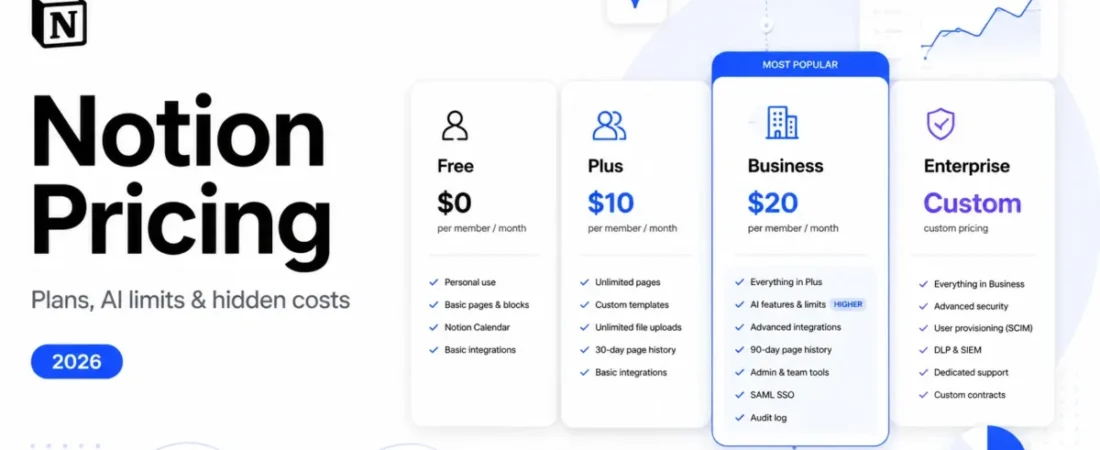
Notion offers four primary subscription plans: Free, Plus, Business, and Enterprise. According to its official pricing page, the advertised monthly prices are based on USD and are charged per member.
Here’s a quick overview:
| Plan | Monthly Price (USD) | Best For |
|---|---|---|
| Free | $0 | Individuals and beginners |
| Plus | $10/member | Freelancers and small teams |
| Business | $20/member | Growing companies |
| Enterprise | Custom pricing | Large organizations |
Annual billing can save customers up to 20% compared with monthly payments. Actual prices, taxes, and available billing options may vary depending on location and checkout arrangements.
1. Notion Free Plan: Start Without Paying
The Free plan is an excellent starting point for anyone who wants to explore the platform without making a financial commitment.
It provides access to essential productivity features, including pages, databases, basic forms, Notion Calendar, and basic website publishing. Individual users can create unlimited pages and blocks, making it practical for personal organization.
Some important features include:
- Personal project and task management.
- Basic database functionality.
- Notion Calendar integration.
- Basic forms and website publishing.
- Limited AI feature trials.
- Up to 5 MB per uploaded file.
- Seven-day page history.
One important distinction is that the Free plan has limitations when multiple workspace members collaborate. Teams may encounter block restrictions, so businesses should evaluate their requirements before choosing it.
For students, bloggers, and independent professionals, however, the free subscription can provide considerable value.
2. Notion Plus Plan: More Freedom for Professionals
The Plus plan costs $10 per member per month at the advertised monthly rate. It is designed for professionals and smaller teams that need more flexibility than the free subscription provides.
One major advantage is improved collaboration. Members can work together without the same restrictions associated with the free workspace.
The plan includes:
- Unlimited collaborative blocks.
- Unlimited file uploads, with a maximum file size of approximately 5 GB.
- Thirty-day page history.
- Unlimited guests.
- Custom forms without Notion branding.
- Additional website customization options.
- More advanced database charts.
- Improved publishing and SEO settings.
The Plus subscription is particularly useful for freelancers managing several clients or small businesses organizing their operations.
For example, a freelance SEO specialist could create separate client dashboards, maintain keyword research databases, organize backlink campaigns, and track publishing schedules without maintaining several disconnected applications.
3. Notion Business Plan: Advanced Collaboration and AI
The Business plan costs $20 per member per month at the advertised monthly rate. It is designed for growing companies that need stronger collaboration, administrative controls, and AI-powered productivity features.
Its biggest attraction is the expanded AI experience.
Business users get access to features such as Notion Agent, AI Meeting Notes, and Enterprise Search beta. These tools help teams find information, summarize discussions, generate content, and complete more complicated tasks.
Other important benefits include:
- Ninety-day page history.
- Advanced database permissions.
- Private teamspaces.
- Permission groups.
- SAML single sign-on.
- Premium integrations.
- Advanced database automations.
- More sophisticated website and publishing controls.
For organizations handling multiple projects, these features can make everyday operations easier to manage.
The Business subscription is worth considering when employees regularly share information, manage confidential projects, or need AI assistance within their existing workspace.
4. Notion Enterprise Plan: Custom Solutions for Large Organizations
Enterprise is designed for organizations with more demanding security, administration, and scalability requirements.
Unlike the other subscriptions, it does not have a publicly advertised fixed monthly price. Interested organizations need to contact Notion’s sales team for a customized quotation.
Enterprise includes advanced capabilities such as:
- User provisioning through SCIM.
- Advanced security and workspace controls.
- Detailed audit logs.
- Domain management.
- Workspace consolidation.
- Advanced compliance integrations.
- Custom data retention settings.
- Dedicated customer success management.
One notable advantage is zero data retention with Notion’s AI model providers for Enterprise workspaces, according to the published plan comparison.
This subscription makes more sense for companies that need centralized administration, controlled access, and organization-wide security policies rather than simply additional note-taking functionality.
Notion Pricing Comparison: Which Features Matter Most?
Comparing subscription prices is useful, but the real value comes from understanding what each plan allows you to accomplish.
| Feature | Free | Plus | Business | Enterprise |
|---|---|---|---|---|
| Monthly price | $0 | $10 | $20 | Custom |
| Page history | 7 days | 30 days | 90 days | Custom |
| File uploads | 5 MB/file | Up to 5 GB/file | Up to 5 GB/file | Up to 5 GB/file |
| AI access | Limited trial | Limited trial | Expanded access | Expanded access |
| Private teamspaces | No | No | Yes | Yes |
| Advanced security | Basic | Basic | Advanced | Organization-level |
| Custom support | No | No | Priority | Premium options |
The most important difference is not necessarily the number of features. It’s whether those features solve a problem you actually experience.
Paying for advanced permissions is unnecessary for someone maintaining personal notes. Similarly, a company with several departments may quickly outgrow a basic subscription.
Does Notion AI Cost Extra?
Notion AI deserves special attention because its availability differs across subscription levels.
The Free and Plus plans provide limited trial access to AI features. These subscriptions should not be confused with unlimited access to the complete AI experience.
Business and Enterprise subscriptions include broader AI capabilities, subject to their applicable plan terms and usage arrangements.
Notion also offers Custom Agents, which are free to try and then cost $10 per 1,000 monthly Notion credits. This is a separate usage-based consideration worth checking before building an AI-heavy workflow.
If AI writing, meeting summaries, workspace searches, and automated assistance are important to your daily operations, compare these capabilities carefully before upgrading.
Is Notion Worth the Money?
In my experience evaluating productivity platforms, the biggest advantage of Notion is how much organization it can bring into one workspace.
Consider a small digital marketing agency managing five clients. Its team needs to track keyword research, content deadlines, SEO reports, meetings, and campaign progress.
Instead of paying for several separate tools, the agency could organize many of these activities through Notion databases, project boards, and shared documentation.
However, Notion is not automatically the best solution for everyone. Some users prefer dedicated project management software, while others need more specialized accounting, communication, or customer relationship management tools.
The smartest approach is to identify your daily requirements first and then choose the least expensive plan that satisfies them.
How to Choose the Right Notion Subscription
Your ideal subscription depends on how you intend to use the platform.
- Choose Free if you primarily manage personal notes, tasks, and projects.
- Choose Plus if you need unlimited collaboration, larger uploads, and improved publishing features.
- Choose Business if your organization requires advanced permissions, integrated AI capabilities, and private teamspaces.
- Choose Enterprise if your company needs customized security, compliance, and centralized administration.
Students and educators should also check eligibility for Notion’s education offer. Eligible individual students and teachers can receive the Plus plan free of charge with an eligible school email address.
Also Read: How Much Does ChatGPT Cost? Plans and Pricing Guide
Conclusion
Understanding Notion pricing makes it easier to select a subscription that matches your productivity requirements and budget. The Free plan is a practical starting point, Plus provides additional flexibility, Business introduces advanced collaboration and AI features, and Enterprise supports organizations with more complex requirements.
Rather than choosing the most expensive subscription, focus on the features you will genuinely use. Start small, explore the available tools, and upgrade when your workflow requires additional capabilities. This approach helps you get meaningful value without paying for unnecessary features.
FAQs
1. Is Notion completely free to use?
Yes. Notion offers a Free plan that includes personal pages, databases, basic forms, calendar functionality, and website publishing. Some collaboration and AI features have limitations.
2. How much does Notion Plus cost per month?
Notion Plus is advertised at $10 per member per month when billed monthly. Annual billing can reduce the effective monthly cost.
3. Does Notion charge per user?
Yes. Paid plans generally charge according to the number of workspace members. Adding more members increases the subscription cost.
4. Is Notion AI included in the free plan?
The Free plan provides limited trial access to AI capabilities. Continued access to expanded AI functionality requires an eligible subscription or applicable AI credits.
5. Can students get Notion Plus for free?
Eligible individual students and educators can receive the Plus plan free through Notion’s education offer. Eligibility depends on having a qualifying educational email address.
6. Is Notion Business better than Plus?
Business is better suited to growing teams that need advanced permissions, private teamspaces, AI capabilities, and more sophisticated administrative features. Plus is generally sufficient for freelancers and smaller teams.
7. Can I cancel my Notion subscription?
You can change or downgrade your workspace plan through its billing settings. Review your billing cycle and applicable subscription terms before making changes.
8. Is annual Notion billing cheaper?
Yes. Notion advertises savings of up to 20% with annual billing compared with monthly payments, depending on the subscription and applicable pricing.